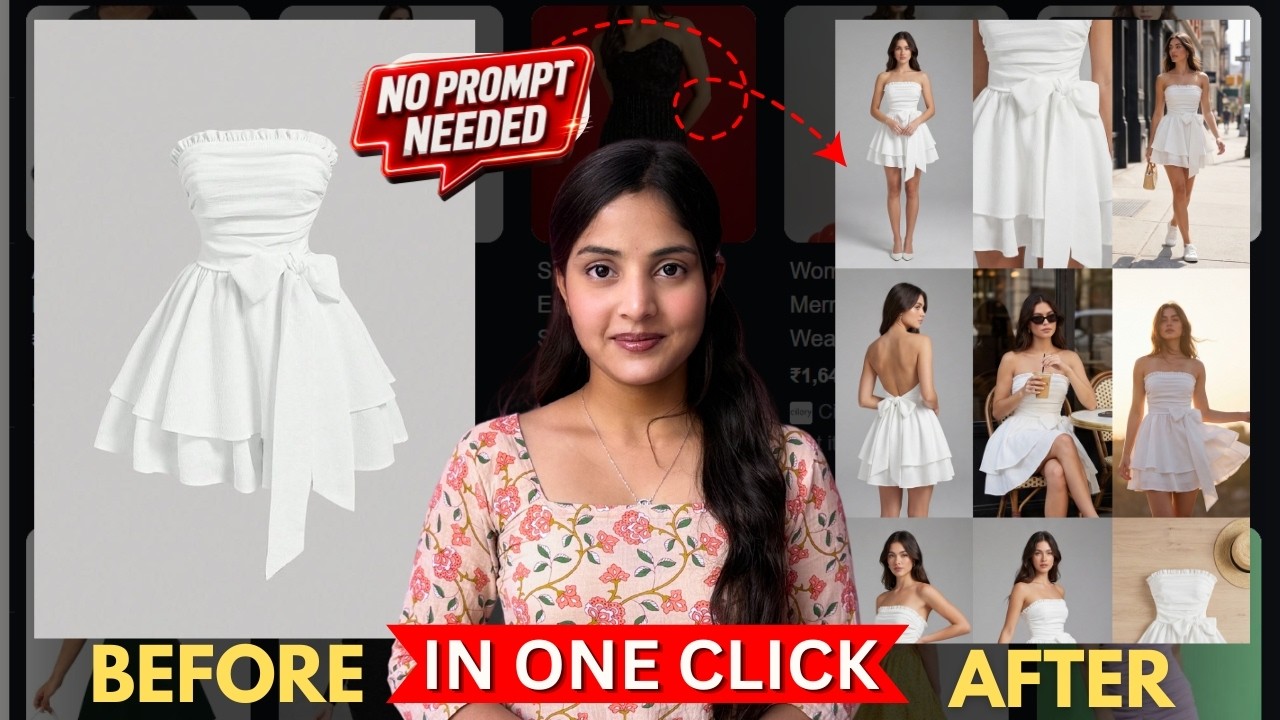
Creating professional product photos used to require expensive cameras, photographers, models, studios, and long editing hours. But now, AI is completely changing the game. With tools like Morphic Studio, anyone can create stunning catalog photos, fashion shoots, and product showcase images in just one click — without writing complex prompts.
Whether you sell ethnic wear, western outfits, jewelry, skincare products, or accessories, this AI tool can generate highly realistic product photography that looks professionally shot and ready for eCommerce or social media marketing.
According to the shared tutorial transcript, Morphic AI allows users to generate realistic fashion and product photos quickly using ready-made workflows instead of manual prompting.
What is Morphic AI?
Morphic Studio is an AI-powered creative platform that helps users generate:
- Product photos
- Fashion shoots
- Catalog images
- Lifestyle photography
- AI-generated reels
- Jewelry campaigns
- Product ads
- Virtual try-ons
The best part is that you do not need advanced prompting skills. The platform already includes pre-built workflows and templates that automate most of the creative process.
The tutorial explains that users can simply upload a product image, choose a photography style, and let the AI generate multiple realistic product shots automatically.
Why This AI Tool is Going Viral
Businesses and creators are rapidly adopting AI product photography because it saves:
- Time
- Money
- Editing effort
- Studio costs
- Model hiring expenses
Traditional product shoots can cost thousands of rupees, while AI tools can create similar results in minutes.
Morphic AI is especially useful for:
- Clothing brands
- Instagram stores
- Shopify businesses
- Amazon sellers
- Jewelry brands
- Small businesses
- Dropshipping stores
- Digital marketers
The transcript highlights that even fabric prints and clothing details remain realistic in generated images, making them appear authentic to customers.
How to Create AI Product Photos Step-by-Step
1. Open Morphic Studio
Go to Morphic Studio and click on “Start for Free.”
Login using your Google account.
New users receive free credits to test the platform. The tutorial mentions that users initially get 20 free credits.
2. Open the Workflow Section
After logging in, open the “Workflow” section.
Inside, you will find many AI templates such as:
- Cinematic scenes
- Motion transfer
- Character progression
- Virtual try-on
- Fashion reels
- Product photography
The transcript specifically mentions the “Fashion Reel” workflow for generating professional fashion-style product images.
3. Upload Your Product Photo
Upload a clean image of your product.
You can upload:
- T-shirts
- Sarees
- Dresses
- Jewelry
- Shoes
- Bags
- Cosmetics
- Accessories
The better your original image quality, the better the AI output.
4. Choose Photography Style
Morphic AI gives multiple photography styles such as:
- Lookbook
- Editorial
- Street Style
- Product Showcase
- Lifestyle
Choose the style that matches your brand identity.
For example:
- Editorial works well for luxury fashion
- Lifestyle works well for Instagram marketing
- Product showcase works best for Amazon listings
The tutorial demonstrates selecting the “Lookbook” style before generating images.
5. Select Model Preference
You can choose:
- With model
- Without model
- Mixed
This makes the workflow extremely flexible for different business types.
The transcript explains that users can generate full AI model-based fashion shoots directly from a single product image.
6. Generate AI Photos
Click “Run Workflow.”
Within minutes, the AI generates:
- Multiple camera angles
- Different poses
- Various environments
- Professional compositions
- Grid layouts
- Separate exportable images
The tool can create a full fashion photoshoot automatically from one uploaded product image.
Smart Tip to Save Free Credits
One useful trick shared in the tutorial is stopping the workflow after image generation.
Why?
Because the workflow may continue generating:
- Background music
- Video clips
- Fashion reels
This consumes additional credits unnecessarily.
The transcript specifically recommends stopping the process after images are generated to save remaining free credits.
Types of AI Product Shoots You Can Create
Morphic AI supports many creative formats including:
Fashion Catalog Shoots
Perfect for:
- Clothing brands
- Boutique stores
- Instagram fashion pages
Jewelry Campaigns
Create premium luxury jewelry ads without expensive studios.
Product Explosive Ads
Generate dramatic AI product advertisements with cinematic effects.
Lifestyle Product Photography
Create realistic lifestyle scenes around your products.
Professional Ad Shoots
Generate commercial-style brand visuals for ads and websites.
The tutorial mentions multiple ready-made workflows for catalog shoots, jewelry campaigns, and product photography.
Benefits of Using AI Product Photography
1. No Prompt Engineering Needed
Perfect for beginners who struggle with complex prompts.
2. Budget-Friendly
Eliminates expensive photoshoots.
3. Fast Results
Generate professional visuals in minutes.
4. High Realism
Products maintain accurate textures, colors, and details.
5. Multiple Variations
Create many styles from a single product image.
6. Great for Social Media
Ideal for Instagram ads, reels, and eCommerce posts.
Who Should Use Morphic AI?
This tool is ideal for:
- eCommerce sellers
- Clothing brands
- Fashion creators
- Shopify stores
- Amazon sellers
- Influencers
- AI content creators
- Digital marketing agencies
- Product advertisers
If you run a business and want professional visuals without expensive production costs, this AI tool can save huge amounts of time and money.
Final Thoughts
AI product photography is becoming the future of eCommerce marketing. Tools like Morphic Studio are making professional-quality product shoots accessible to everyone — even beginners with zero design experience.
Instead of spending hours writing prompts or organizing expensive shoots, you can now upload a single product image and generate realistic catalog photos in one click.
For brands, creators, and marketers, this technology is a massive opportunity to scale content creation faster than ever before.
If you are looking for an easy AI tool to create stunning product visuals without prompting, Morphic AI is definitely worth trying.
